We talk all about more on Education.....

Showing posts with label digital learning. Show all posts
, , , ,

Buncee and Immersive Reader: A Winning Combination for Assistive Learning

I am a huge fan of Buncee. The following is a guest post by Rachelle Dene Poth (@Rdene915), Spanish and STEAM Teacher at Riverview High School in PA.

For several years, Buncee has been one of my favorite creation tools; both for personal use and for classroom instruction. While there are many digital tools to choose from when it comes to teaching and having our students create, Buncee’s versatility and ease-of-use make it a go-to tool for all creative needs. Now, Buncee’s recent integration with Microsoft’s Immersive Reader makes the platform even more accessible for students of diverse ages, backgrounds, and abilities to learn 21st-Century Skills and express themselves. What my students love the most is that Buncee offers something for everyone, and I love that they love it.

Always keeping a finger on the pulse of their community’s needs, the Buncee team consistently listens to their community and refines the platform based on this! Their integration with Immersive Reader is a perfect example of this.

Immersive Reader: It’s About Opportunities For ALL Students 

This summer, Buncee integrated with Microsoft’s Immersive Reader, increasing accessibility for students and offering a robust environment to build literacy skills. Immersive Reader is a full-screen accessibility tool, supporting the readability of text in Buncees for language learners and their families and students with dyslexia or visual impairments. Any text added into a Buncee can be translated and read aloud in over 60 languages.

There are many ways Immersive Reader can enhance learning opportunities for students. It can help to build their confidence and create an inclusive classroom environment. Educators can use this integration to create lessons, make interactive flashcards for students, and communicate with families. Inclusive learning and providing for students and families from different backgrounds is something that the Buncee and the Microsoft team are definitely passionate about, making this integration a natural fit.

Imagine the possibilities for reaching students and their families of non-native English speaking homes, or supporting students who are just learning to read. The use of Immersive Reader in Buncee enables students to do more than just create multimedia content, it helps them improve reading and language learning skills as they engage with the content in authentic and meaningful ways. 

How Does Immersive Reader Work in Buncee? 

There are several ways to help students build their skills through the different options available within Buncee and using Immersive Reader. Getting started with Immersive Reader in Buncee is easy.

By clicking on the Immersive Reader icon when viewing a Buncee, a personalized reading and learning experience for students appears. Immersive Reader accesses the text in the Buncee, offering a multitude of options. Families can access these features at home as well, without having to log into or need any specific account. 

Navigating the Immersive Reader Functionality In Buncee

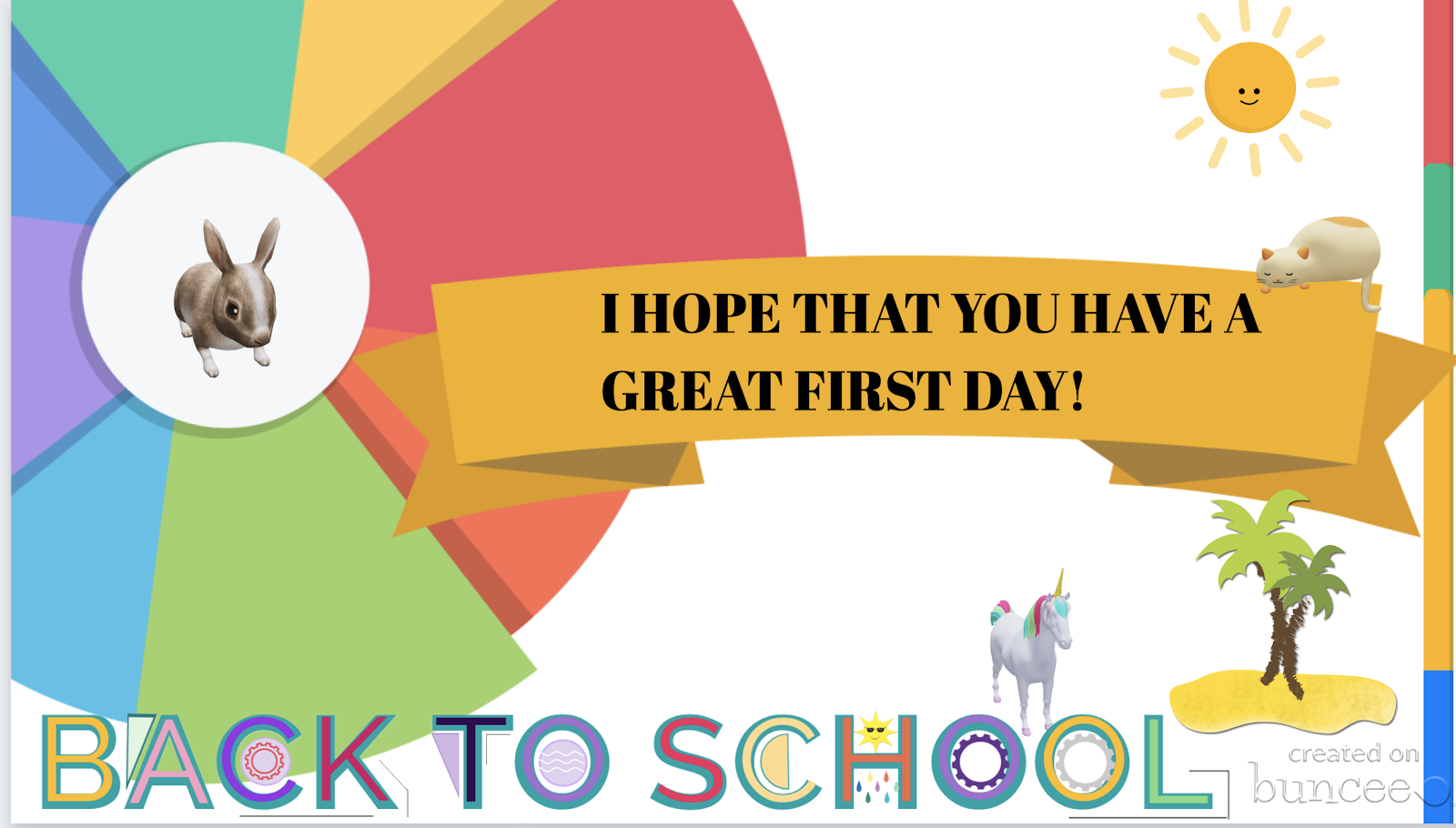
I decided to create a Buncee using some of the new 3D objects and also explore the options available through Immersive Reader. For first time users, it is easy to figure out how to adjust the settings. 

First, I clicked on the speaker symbol at the bottom to listen to the text read aloud. Students could use this as a way to practice their own pronunciation, especially when using it for language learning, by repeating after the speaker. Students can also build listening comprehension skills by focusing on written words and making connections with the audio. 
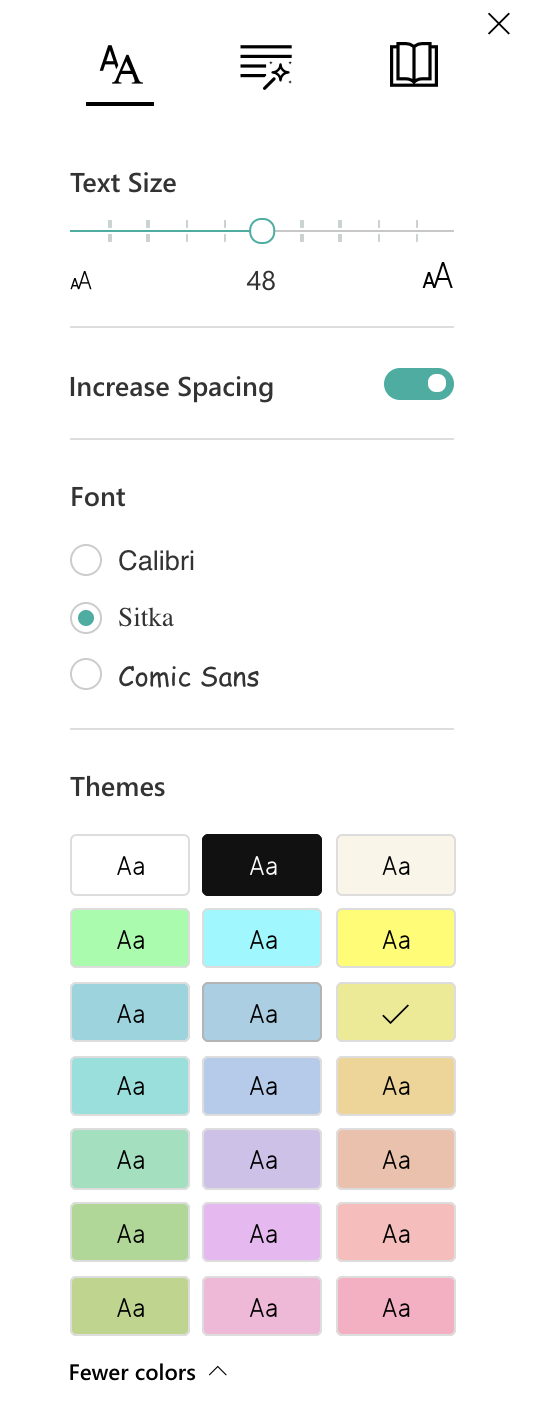
 

By clicking on text preferences, I can choose the text size, increase spacing, and select from three choices in font style. These are great options to help with readability for students. There are also 21 color choices for the background on the screen. I find this to be very useful, especially as someone who can be sensitive to certain colors when reading. I've also had students experience difficulty with reading on certain colored backgrounds, so this is a definite plus. 
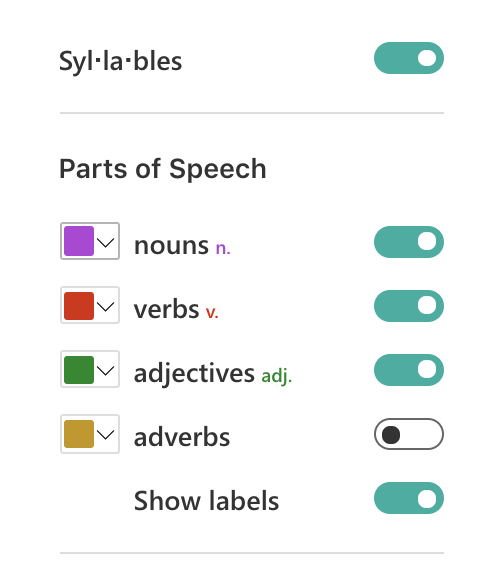

The grammar options enable you to break words up by syllables and also color code the different parts of speech. Being able to use the color codes to help with the identification of nouns, verbs, adjectives, and adverbs will help students to build their grammar skills. These labels can be turned on or off, which means that families can work with their children and use it as a teaching tool for review. 


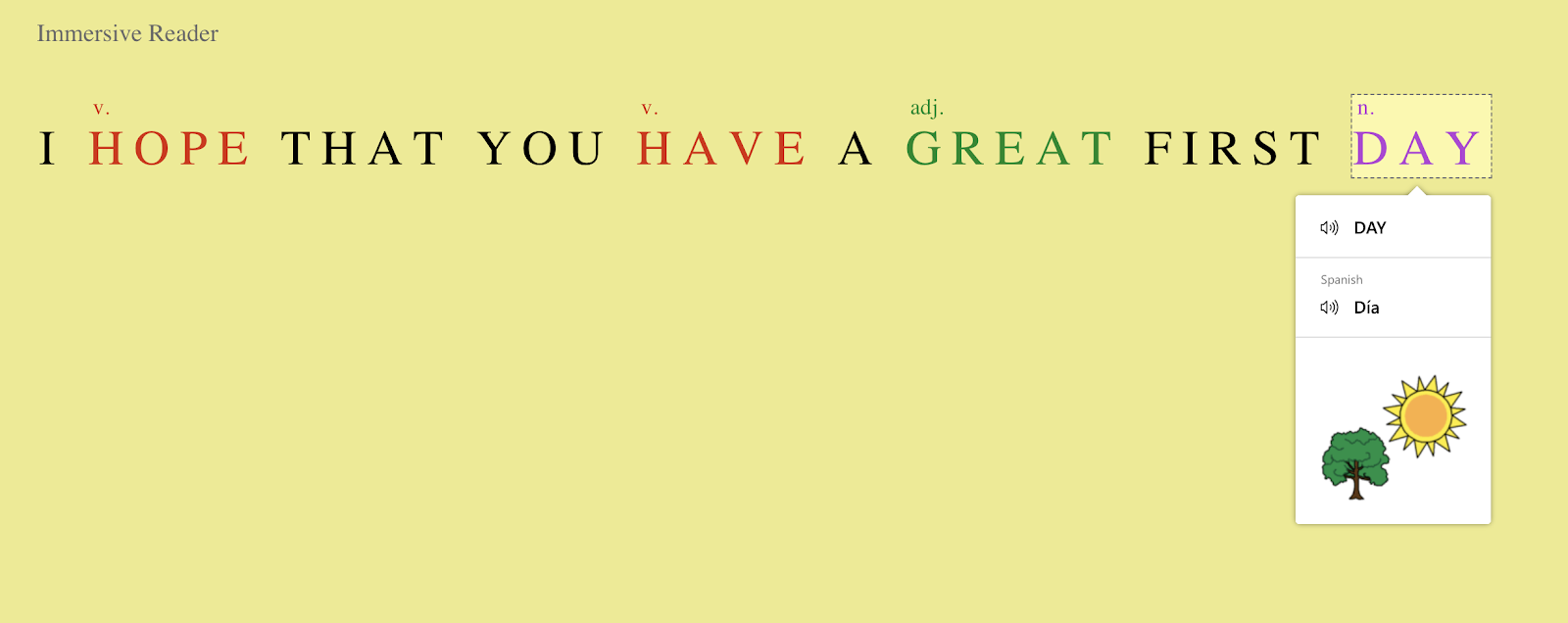
Just to experiment, I turned everything off except for the verbs. Displayed on the screen were the two verbs in the sentence both highlighted in red. I then selected a different color for each part of speech, I chose purple to identify nouns and green for the adjectives. I was amazed at how quickly this could be set up and the possibilities for helping students with reading comprehension and language skills. Using this as a way to further engage students with identifying parts of speech and making the visual connection is another option for more interactive learning.

Under reading preferences, you can focus on one line or on the entire text.

When you focus on a line, it closes the screen down to that one specific sentence, which you can also make narrower or thicker depending on your choice. 


There are more than 60 languages available for translation. I decided to try French first, and when I clicked on a word, it showed me the word in French and in English. I also explored other languages, including Spanish and was impressed with how much it offered to reinforce the content and to provide a more personalized learning experience for students. There is also a picture dictionary to visually reinforce vocabulary acquisition. You can choose the voice and speed of reading, so it provides a great way to reinforce speaking skills as well as listening, reading and writing. 

In his book, Digital Leadership, Eric Sheninger talks about the critical competencies needed by learners for success in today’s world. These competencies are in alignment with the ISTE standards for students and teachers and can be addressed through the use of Buncee. Now with the Immersive Reader integration, the possibilities to address these standards are open to all learners. Beyond the potential for creativity, collaboration, critical thinking, and communication, students using Buncee can build skills in digital media literacy, entrepreneurship, technological proficiency, and digital citizenship. Students have the opportunity to use technology as a tool for solving real-world problems and making real-world connections. We have to look beyond simply using digital tools to engage students in learning and instead, empower them through opportunities to apply what they have learned in unique ways. 
Share:
Read More
, , , , , ,

School of Dreams

As many people know I am originally from the Northeastern part of the United States.  I was born and raised in New Jersey, where I also became a teacher and eventually a principal.  After meeting my wife in 2002, I moved to Staten Island, NY and resided there for thirteen years. To be honest, I never thought I would leave that area of the country as my wife, and I had such strong roots there. Things change, however.  The successful digital transformation at the school where I was principal attracted a great deal of attention from the mainstream media, schools locally and globally, and organizations, in part because we were able to show efficacy in our work.  It was at this time that I decided to take a calculated risk and attempt to help other schools scale their digital and innovative change efforts.

As I transitioned from principal to Senior Fellow with the International Center for Leadership in Education (ICLE) my work began to take me all over the country and the world.  I vividly remember the day when I was away working in Hawaii, and Staten Island got dumped with over a foot of snow.  Shortly after I returned home, my wife sat me down and gave me an ultimatum.  I either had to go back to being a principal so I could be home to shovel any and all snow in the future or we had to move somewhere else in the county where it was warm and didn’t snow at all.  My wife knew full well how much I love the work that I do so out came a map of the United States and the discussions as to where we would raise our family for the foreseeable future began.

During our discussions, I had to set my non-negotiables.  She wanted warmth and no snow while I needed a huge airport that was centrally located to cut my flight times and connections down.  There were only two realistic choices at this point, Dallas and Houston. Since Houston was a bit further south and we could get the exact home we wanted the decision was made.  One other factor that weighed heavily in our decision-making process was the school district that our children would attend.  The icing on the cake for me was that when it was all said and done taking into account our non-negotiables, we decided to build our home within the Cypress-Fairbanks Independent School District (CFISD). 

CFISD is an amazing school district that is not only one of the highest achieving large districts in the state of Texas, but also firmly committed to scaling innovative practices to improve learning for all 120,000 students. For the past year and a half, my team and I at ICLE have been assisting the district with doing Bring Your Own Technology (BYOT) K-12, incorporating blended learning, and aligning sound pedagogy to the use of flex spaces.  We have also used our Digital Practice Assessment (DPA) process to help them determine where they are at, but more importantly where they want to be for their learners. Now back to my story.

Shortly after arriving in the Houston area I was contacted by Cheryl Fisher, a local CFISD elementary principal.  She had been following me on Twitter and asked if I would be willing to visit her school and see how they were implementing blended learning across all grade levels.  What I saw just warmed my heart, but more on this later.  A little over a year later Cheryl was named the principal of Wells Elementary, a brand-new school right smack in the middle of the community where I lived.  I couldn’t control my excitement, but there was a challenge ahead in the form of my daughter, Isabella.


Bella, who was in 4th grade at the time, had a big decision to make. Stay in the other community school where she had made friends for two years or go to a brand-new school for her last year of elementary school. To be honest, she was leaning on staying put. I discussed this with Cheryl, and she said quite bluntly, “If your daughter decides to come to Wells she will love learning every day.” Well, I was already hooked, but Cheryl also made the time to meet with Bella and explain in detail the vision she had for the learning culture at Wells.  What followed was the waiting in anticipation of what Bella would decide to do. 

Well, my daughter, on her own without much pressure from my wife and I, decided to attend Wells Elementary. Every day I ask her how school was and literally tear up when she responds as the answer is always the same – “It was great Daddy.” My daughter is entirely in love with the school. As an educator and parent, this means so much more to me than her consistently being advanced proficient every year on all standardized tests.  Wells Elementary to me is a school of dreams because my daughter loves learning.  Here are some specifics as to why:
  • School-wide decision to have no homework.
  • Students K-5 are empowered to use their technology to support their education as part of BYOT. In addition to this, technology is used to support and enhance learning while providing authentic opportunities to explore concepts.
  • Strategic use of the station rotation blended learning model to maximize learning time and increase student agency.
  • Incorporation of flexible learning spaces throughout the building.
  • Portfolio-based assessment using Seesaw and Google Classroom to provide better feedback to students.
  • An entire staff that believes in the power of being connected and the importance of having a Personal Learning Network (PLN).
  • Systemic use of a variety of social media tools to communicate with stakeholders and keep them in the know.
I encourage you to check out this video where Cheryl and one of her teachers discuss the digital transformation at Wells Elementary.


It is important to know I am not just making the casual statements about using only my parent lens.  I am honored by the fact that I am the one who is engaged with Wells as part of ICLE’s partnership with CFISD to support the district with our Digital Leadership and Learning solutions.  As the job-embedded coach for the school, I have been working with the teachers and administrators and will continue to do so throughout the school year.  Even though there are some fantastic initiatives in place as mentioned above, the Wells community knows that there is room for improvement.  This is the case in any classroom, school, or district. Together we are working on the pedagogical shifts needed to support their bold vision and plan for innovative learning.  

All in all, this is a school of dreams in my opinion.  The fact that my daughter loves learning and is being prepared for her future means the world to my wife and me.  Thank you to all the educators at Wells and CFISD who are have brought so much joy to my daughter. With the compelling learning opportunities she is experiencing, I hope that she will be further motivated to follow her dreams, no matter what they are. 
Share:
Read More
, , , , , , , ,

Measuring Impact with the Digital Practice Assessment (DPA)

Note: This post is directly related to my work at the International Center for Leadership in Education

Efficacy has been on my mind a great deal as of late, and as a result, it has been reflected in my writing.  When I think back to the successful digital transformation and implementation of innovative practices at my former school when I was a principal the key driver for us was the ability to show, not just talk about, evidence of improvement.  By combining both quantitative and qualitative measures, we were able to articulate the why, how, and what, as well as the detailed process that went into each respective change effort.  The “secret sauce” in all of this was the strategic use of digital tools to proactively share the details of our efforts and resulting impact.  


Image credit: http://www.assafh.org/

During my tenure as a principal, I was always in search of tools and processes to help measure the impact of the changes we were implementing.  Unfortunately, nothing existed.  As I work with schools and districts on a weekly basis, I am often asked how they can determine the impact and effectiveness of the many innovative initiatives they have in place. Practices such as BYOD, 1:1, blended learning, personalized learning, classroom and school redesign, branding, makerspaces, professional learning, etc.  This need served as a call to action of sorts and catalyzed my current work.  As Senior Fellow with the International Center for Leadership in Education (ICLE), I have worked with a fantastic team to develop services and tools to help districts, schools, and organizations across the world transform teaching, learning, and leadership.  One of these tools is the Digital Practice Assessment (DPA). 

The DPA creates the context for our work with leaders and teachers, providing authentic baseline data to support personalized professional learning. It begins by examining the strategies in place at each school or district that support student learning with technology in the areas of rigor, relevance, relationships, engagement, and overall culture. The process then moves to understanding the current leadership practices in place to successfully implement technology and innovative practices, aligned to the 7 Pillars of Digital Leadership & Learning (Student Learning, Learning Spaces & Environment, Professional Growth, Communication, Public Relations, Branding, and Opportunity). 


Through this proven model, our consultants can help schools and districts identify opportunities to begin their transformation or take their digital and innovation goals to the next level, leveraging the knowledge, experience, and practice of ICLE’s thought leadership. The DPA process consists of a combination of a self-reflection questionnaire rubric, on-site observations, and online inventories comprised of data and evidence collection. We then leverage evidence-based rubrics to observe leadership and instructional practices while collecting artifacts to provide evidence of effective digital learning and innovative professional practice. Once collected and analyzed, a detailed summary report outlining areas of success, focus opportunities, and recommended next steps will guide the professional learning partnership with ICLE, supporting the development of a strategic professional learning and implementation plan. 

Below is a summary of the DPA process:

Step 1: The Pillars of Digital Leadership Questionnaire is completed by the district or school. This 18 question rubric asks school leaders to reflect on their perceptions for where their school falls on a continuum from not yet started to well developed. During this reflective process, it is expected that school leadership teams collect and document aligned evidence for each item.  This information is completed and archived in the Professional Learning Portal (PLP), a free digital platform developed by ICLE to support schools in data collection,  reflection and goal setting, to grow and improve. The baseline evidence shared is in the context of digital leadership and learning (including examples of data, lesson plans, unit plans, student work, PLC minutes, rigorous digital performance tasks, walk-through forms, assessments, sample observations/evaluations, portfolios, PD plans, social media accounts, pictures, videos, press releases, media coverage, partnerships, etc). 

Step 2: On-site observations and interviews are conducted by consultants to validate perceptions and evidence collected for the seven Pillars of Digital Leadership Questionnaire, as well as targeted classroom observations of student learning, aligned to rigor, relevance and engagement. Additional data is collected and archived in the PLP during classroom observations. The idea is to engage school leaders in dialogue about their culture, student learning and digital integration, no matter where they are with their digital transformation. 

Step 3: The data and evidence are tightly aligned to ICLE’s research-based rubrics to provide a detailed view of where a district or school is with their digital transformation.The data and artifacts are analyzed, leading to a summary report that details the current state of practice at each school or in the district. 

Step 4: The DPA report is shared and discussed with the school leadership team. In partnership with ICLE, observations about the evidence collected are shared and discussed. During the strategic planning process, discussions focus on areas of strength and improvements to develop a tailored and personalized implementation plan.

Step 5: On-going professional learning is implemented and progress monitoring through the online Pillars of Digital Leadership Questionnaire is documented to determine the efficacy of the digital transformation.

The DPA process has been created to support districts and schools looking for ways to measure and articulate the impact of technology and innovation on practice.  While data is valuable, it moves beyond this as the only metric for success by actually taking a lens to an array of strategies and practices that combine to create a thriving learning culture.  

The DPA doesn’t just look at technology and innovation. It also provides insight on all elements of school culture and student learning.  In addition to being informed by a broad body of research and driven by evidence, the DPA process is also aligned to the following:


We don’t know where we are and how effective change is until steps are taken to look critically at practice. We hope that through the DPA process we can help you develop, refine, measure, and then share amazing examples that illustrate how efficacy has been attained.  

If you are looking for a method of determining where you are and where you want your district or school to be in the digital age, please contact Matt Thouin at ICLE (MThouin@leadered.com).  He can arrange for an interactive and detailed look at the DPA rubrics and process as well as the PLP platform from the convenience of your home or office.  We look forward to supporting you on your journey toward systemwide digital transformation. If you have any questions for me, please leave them in the comments below.

Copyright © by International Center for Leadership in Education, a division of Houghton Mifflin Harcourt. All rights reserved. 
Share:
Read More
, ,

A Pedagogical Shift Needed for Digital Success

In a previous post I discussed in detail strategies to help ensure the effective use of technology to improve learning outcomes. You don’t have to be a fan of technology, but you do need to understand that it’s a catalyst for some exciting pedagogical changes.  The purposeful use of technology can innovate assessment, transform time frames around learning, increase collaboration, enable learning about information and research thanks to unprecedented access, and provide a level of student ownership like never before. These are all outcomes that any educator would (or should) openly embrace. 

I get the fact that technology can increase engagement, but if that engagement does not lead to evidence of learning then what’s the point?  Like it or not, all educators are being held accountable in some form or another for improvement in learning outcomes that result in an increase in achievement.  This is why evidence of a return on instruction (ROI) when integrating technology is critical. Just using it to access information is also not a sound use. As teachers and administrators we must be more intentional when it comes to digital learning.  If the norm is surface-level integration that asks students to demonstrate knowledge and comprehension the most beneficial aspects of digital are missed. A recent article by Beth Holland for Edutopia reinforced many of my thoughts as of late on this topic. Below some words of caution from her:
“The dissemination of digitized, teacher-driven content is not full blended learning. Though this can be viewed as a first step toward new models of learning, the peril lies in complacency. When blended learning is equated with digital workflow, students remain consumers of teacher-directed content instead of becoming creators of knowledge within a context that they can actively control.”
Student agency is one of the most powerful improvements that technology can provide.  This is the ultimate goal in my opinion, but to begin to set the stage for consistent, effective use a uniform pedagogical shift has to be our focus when it comes to digital learning.  The Rigor Relevance Framework provides a solid lens to look at the learning tasks that students are engaged in and redesign them in ways that move away from telling us what they know and instead showing whether or not they actually understand.


This simple, yet powerful shift can be applied to all digital activities. Now I full understand there is a time and place for basic knowledge acquisition and recall, especially at elementary level. However, the goal should be an evolution in pedagogy, especially assessment, where students can demonstrate conceptual mastery in a variety of ways. Instead of using technology to ask students what the capitol is of a state or country ask them to create a brochure using a tool of their choice and explain why the capitol is located where it is.  When designing digital learning tasks think about how students can demonstrate understanding aligned to standards by:
  • Arguing  
  • Creating
  • Designing 
  • Inventing
  • Concluding
  • Predicting
  • Exploring
  • Planning
  • Rating
  • Justifying
  • Defending
  • Comparing
It is important to understand that the verbs above should apply to a range of innovative learning activities, not just those involving digital tools.  By moving away from the use of technology to support low-level learning tasks we can really begin to unleash it’s potential while providing students with greater relevance through authentic work.  This shift will take some time, but the ultimate learning payoff is well worth it. Below are some examples of how my teachers made this shift when I was the principal at New Milford High School:
Mr. Groff’s history classes utilized Paperlet, a participatory technology platform where students created digital stories that incorporated various multimedia elements including video, sound, and image files. The students worked with Mrs. Fleming on Google Chromebooks in the library to design their e-books. During the course of the activity students made recommendations to Paperlet designers on needed changes and enhancements, which were immediately made to improve student experiences.  
Students in Mrs. Groff’s Voices in Poetry and Prose classes had been reading independently since the beginning of the school year. They chose their own books to read based on their interests and reading levels. Students then worked with Mrs. Groff and Mrs. Fleming to create book trailers on their favorite books. Students used WeVideo, Windows Movie Maker, iMovie, and other available technologies to create their videos. These trailers were then loaded onto WeVideo and a hash tag was used to share and get feedback from all over the world. 
Jessica Groff and Joanna Westbrook created an ELA task that incorporated Twitter into their unit on Julius Caesar and built on content authentic to the play – i.e. social media repurposed with and for academic discourse. To accomplish their goals, these teachers began with an informational text on the history of the Roman Forum to ground their use of social media in historical discourse and academic content. In addition, the teachers worked with students to reverse engineer the rhetoric of Twitter and generate a list of the style of the tweets students see currently in their daily lives. They also used Mozilla Thimble to create memes that allowed both the tech-savvy and non-tech savvy to present their visuals in a more professional manner. The use of this technology allowed students to bring visual clarity, some humor, and some creativity to their responses.  
Mr. Devereaux's AP Biology class used the apps iMotion and Stop Motion Studio to create stop-motion videos showing the process of meiosis. They used iMovie to put voice-overs into their videos to describe the process.
Lend a critical lens to your digital learning activities to being to develop more activities where students demonstrate what they understand as opposed to what they just know. As pedagogy evolves in step with technology, a key to success will be to ensure that meaningful, high-level, and valuable learning results. 

Share:
Read More
, , , , ,

10 Tips to Make Learning REAL

Another Christmas has passed and I am continually amazed by the technologies that kids now have access to. For example, my son received a drone from my mother-in-law and has been playing with it non-stop for days now. At first, he was focused on just the basics of flying the device. After having mastered take off, landing, and balance, his focus now is on using the camera to take photos and video.  It is awesome to see how engaged he is with the drone, but that he is also learning in the process.   Technology for him, like most kids today, has become an embedded component of their lives. They have grown up in a world where they have become accustomed to the fast-paced evolution of everything digital. 

The world as we know it has fundamentally changed our learners.  It is not that they are learning differently per say, but the environment in which they learn has dramatically changed.  The challenge for educators and schools today is to make learning REAL (relevant, engaging, authentic, and lasting) for all students and aligning it more with their world.  A great deal of emphasis has been placed on personalized opportunities for students. Whereas there are many benefits with this approach, the reliance on technology platform and human interaction can take away from intended outcomes. REAL learning places a greater emphasis on making learning personal for students. 

Below are some quick tips that can make learning more REAL (relevant, engaging, authentic, and lasting):
  1. Provide students access to real-world tools to do real-world work (i.e. makerspaces).
  2. Allow students to select the best tool to complete a learning task while moving away from a one-size-product-fits-all approach.
  3. Provide meaningful feedback in a timely fashion.
  4. Connect standards and learning outcomes to their interests and passions.
  5. Implement Academy programs (school within a school).
  6. Offer virtual course options and innovative self-paced learning opportunities in lieu of traditional independent study programs (i.e. IOCS).
  7. Transform outdoor spaces into flexible classrooms and stimulating learning environments.
  8. Broaden student horizons by bringing in experts both face-to-face and virtually who work in emerging fields of work. Take kids on field trips through virtual reality technology.
  9. Move away from traditional grading and homework practices.
  10. Clearly articulate the “why” all the time so that students understand how what they are learning impacts them now and in the future.
REAL learning should be a reality for all of our students.  What would you add to the list I have started above? 

Share:
Read More